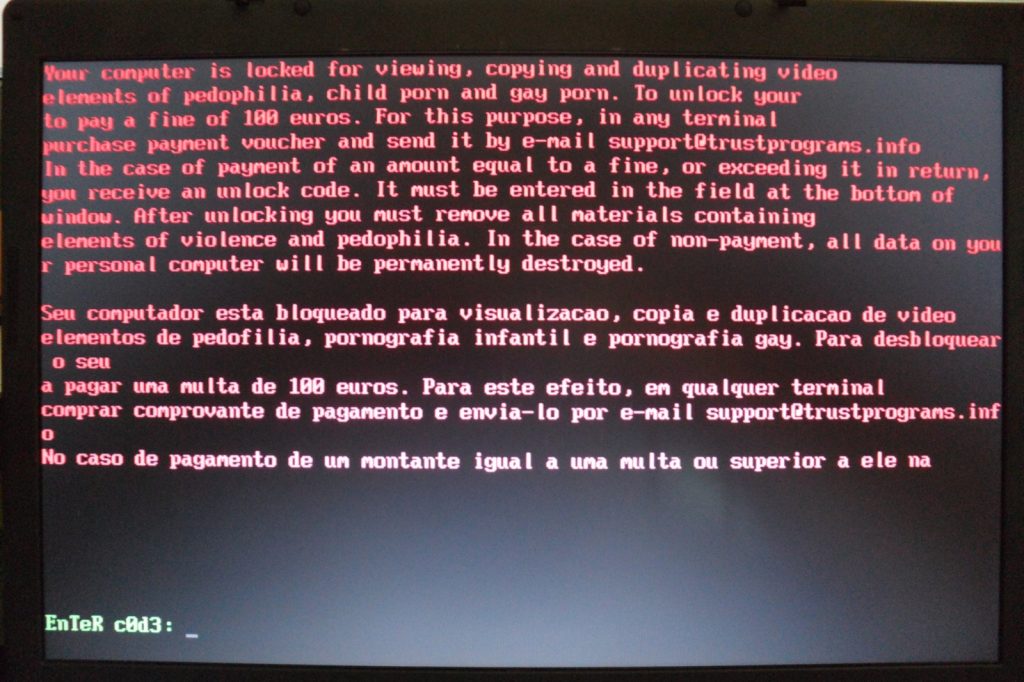
The attackers never dropped an encryptor. They did not need to. Kaspersky said in a September 21 release that a manufacturing company in the Middle East had its computers locked up, covered in ransom notes and stripped of local administrator accounts, all through one rule in its own Active Directory.
The company’s Global Emergency Response Team (GERT) worked the incident and has published a report on it. Kaspersky presents the case as an example of “encryptionless extortion,” a trend it flagged in its State of Ransomware 2026 report. Instead of scrambling files and selling a key, attackers go for immediate disruption and threaten to leak stolen data on the dark web.
In through the front door
No clever malware got them in. According to Kaspersky, the intruders most likely phished their way to highly privileged credentials, then logged straight into the corporate network through ordinary remote-access and VPN entry points. Security monitoring saw what looked like IT staff doing routine work. Nothing was flagged.
From there they went after Active Directory, the backbone of the network, and created a malicious Group Policy Object, or GPO. Administrators normally use GPOs to push settings to thousands of employee machines at once. Because the mechanism is legitimate and highly privileged, Kaspersky noted, harmful changes made with a compromised privileged account can pass for normal IT activity.
The attackers named theirs “PAYLOAD.” Once systems processed the updated policy, it disabled local administrator accounts, pushed out ransom notes, and replaced every computer’s wallpaper and lock screen with a ransom graphic. The theft had come first. After the lockouts, Kaspersky said, the stolen data was published on the dark web to finish the extortion.
What Kaspersky advises
“When attackers hijack central network rules, traditional endpoint malware scanning alone may be insufficient while the malicious Group Policy remains active,” said Elsayed Elrefaei, a security expert on the GERT team. Organizations, he said, should block malicious policies at the source, lock down administrative credentials and watch behavior instead of relying only on malware scans.
The company’s recommendations are specific. Administrators should closely monitor every GPO creation and change, with alerts that fire the moment a new rule is linked to the root of the corporate network. Access to administrative systems and VPN entry points should require phishing-resistant multi-factor authentication, such as physical security keys. General IT administrators should not hold master keys that reach every workstation and server at once, and Domain Admin accounts belong on dedicated, isolated systems.
The full report is on Securelist.